Search Our Database

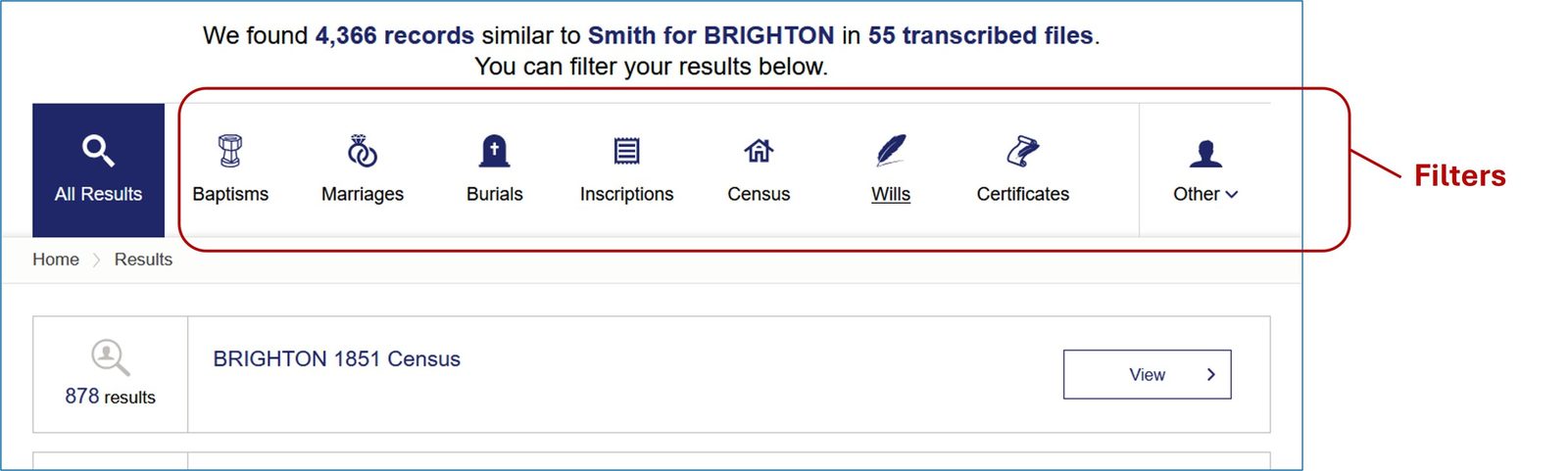
However, it can display up to 100 datasets so it's important to use the filters (shown above) and the navigation (below).



 This will open the list of names included, above which are the files available to download.

 This will open a list of persons whose Wills have been transcribed. If the Will you are looking for has a 'paperclip' next to it there is a file of the transcript available to download. Click on MORE INFO to view.

Getting Started
1. Understanding the Menu
2. Results: Filters & Navigation
3. Sorting
4. File Downloads
_________________________
1. Understanding the Menu
.
2. Results: Filters & Navigation
The results page tells you how many records have been found. It lists them in descending order of results and in which location.
However, it can display up to 100 datasets so it's important to use the filters (shown above) and the navigation (below).
3. Sorting
.
You can sort on any column heading within the results. The data is sorted by the first column initially but clicking on a column header will sort that column alphabetically A-Z. A second click will sort Z-A.
4. File Downloads
.
You can download files that have been attached to MyTree record sets and individual Wills records to enable you to continue your research offline.
MyTree :
If your search returns results within a Family Tree click VIEW
Click on the download icon. This will download the file to your downloads folder or open a new window asking you where you wish to save it.
.
Wills:
If your search returns results for Wills click VIEW
This opens that record and shows an attachment. Click on the SQUARE that says 'enlarge' then DOWNLOAD. (Sorry it doesn't actually enlarge!)

This will download the file to your downloads folder or open a new window asking you where you wish to save it.